
If your Overall Rating under the Report tab is low, Secure Privacy provides a prioritized list of Recommended actions for GDPR compliance for your website. Working through these actions — particularly items marked with a red X — is the fastest way to improve your GDPR compliance score and close the most critical gaps.
Who Is This For?
Website owners and administrators responsible for managing GDPR compliance on their sites
Compliance officers reviewing and improving their Secure Privacy Overall Rating
Web developers implementing cookie blocking, SSL, and consent banner configurations
How to Review Your GDPR Recommended Actions
Navigate to the Report tab in your Secure Privacy dashboard. The Recommended actions for GDPR on [your website] section highlights the steps needed to improve your compliance score. Focus first on items flagged with a red X — these indicate the highest-priority compliance gaps.
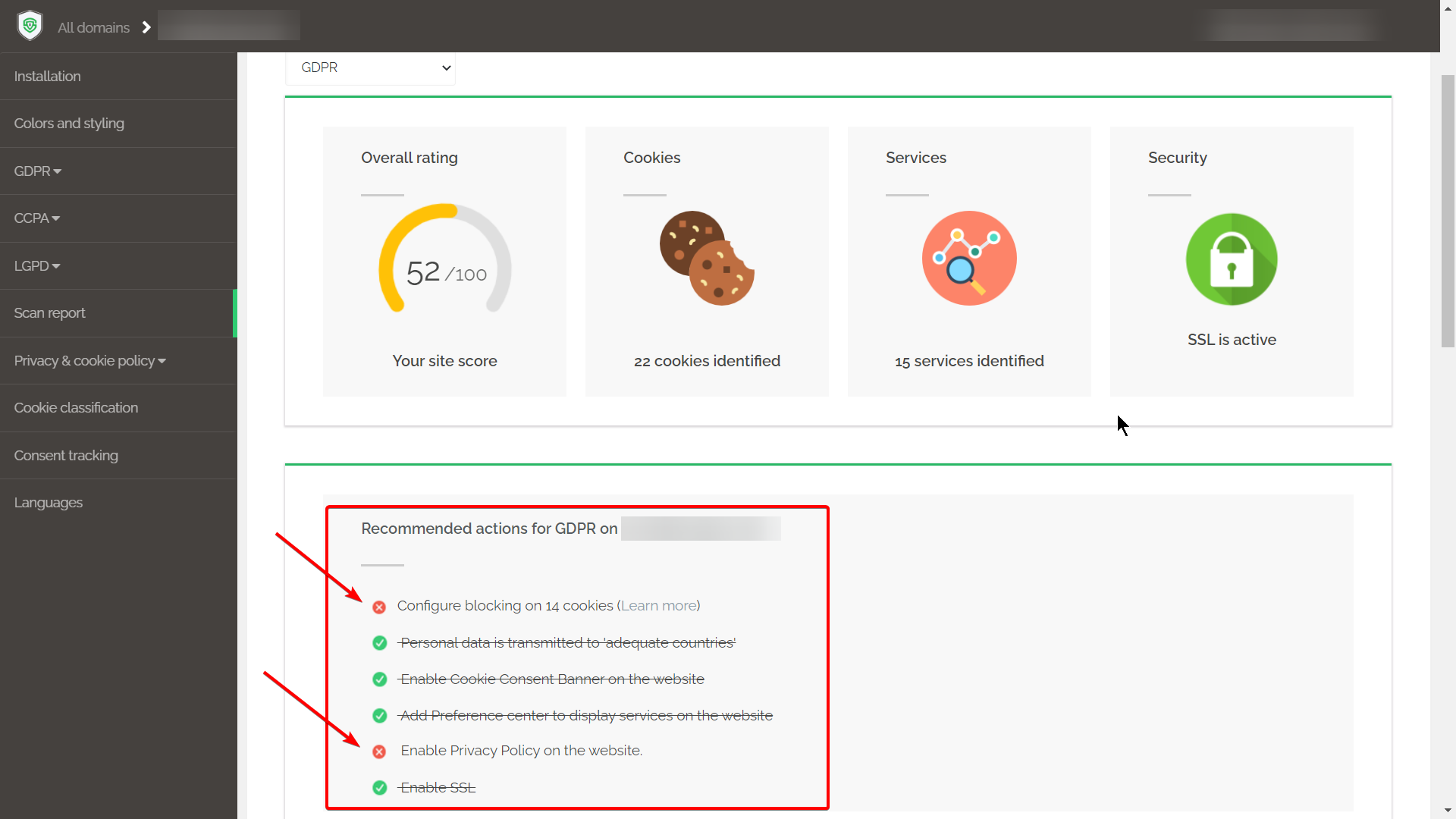
Configure Blocking on Unblocked Cookies
This action indicates that one or more cookies on your website are not being blocked before visitor consent is obtained. First, verify that your Secure Privacy installation is correctly set up for your website's technology stack.
If your installation is correct but blocking issues persist, follow the guide on blocking specific cookies or services to manually configure blocking for the affected services.
Personal Data Transmitted to Third Countries — Adequacy Check
The report flags whether personal data is being sent to countries outside the EU that may not meet the European Commission's adequacy requirements. Review the applicable guidance:
If data is being transmitted to a non-adequate country, ensure an appropriate transfer mechanism is in place — such as Standard Contractual Clauses — before the transfer continues.
Enable the Cookie Consent Banner on Your Website
A cookie consent banner is required under the ePrivacy Directive and GDPR to inform visitors about cookie use and obtain their prior consent before non-essential cookies are loaded. If this action is flagged, your banner may not be enabled or correctly configured.
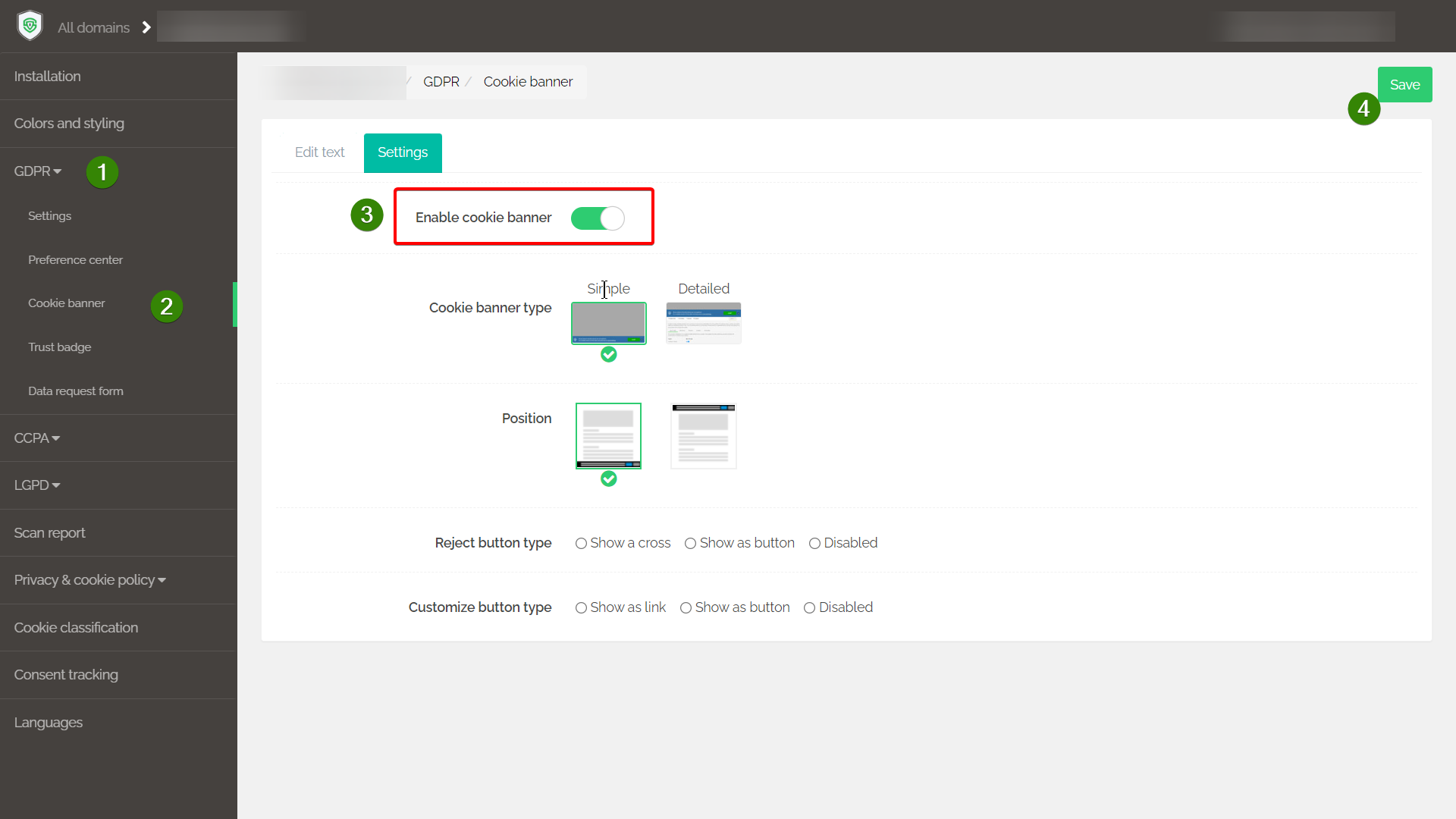
For setup instructions, refer to the Knowledge Base article on cookie banners. Note that banner configuration options depend on your active compliance module.
Add a Preference Center to Display Services on Your Website
The Preference Center gives website visitors a centralized location to view all privacy documents, understand your data practices, and manage their consent choices. It also simplifies compliance management by consolidating all privacy-related information in one place.
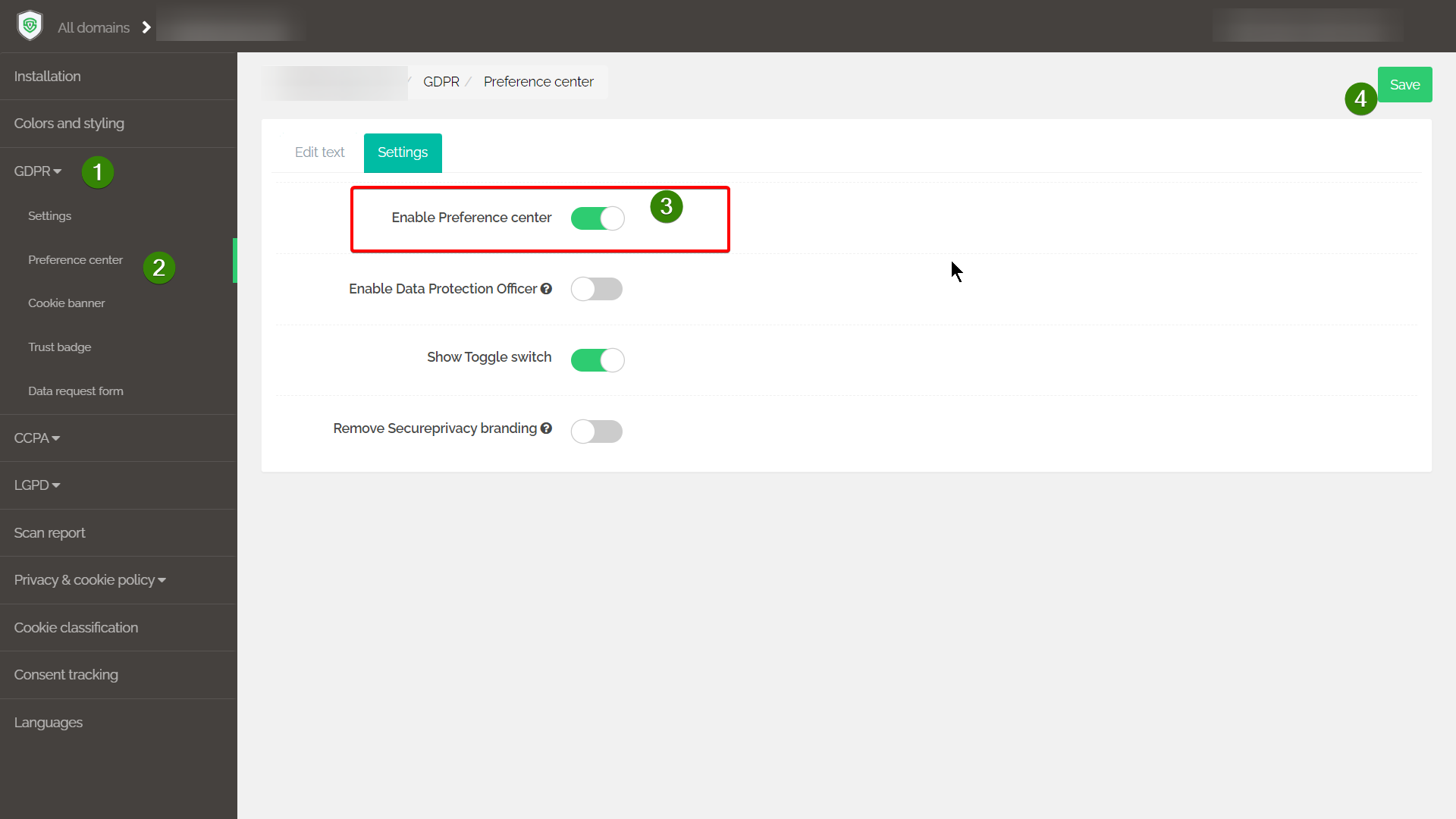
Note: Preference Center settings are specific to each compliance module — configure it within the module applicable to your website.
Enable Privacy Policy on Your Website
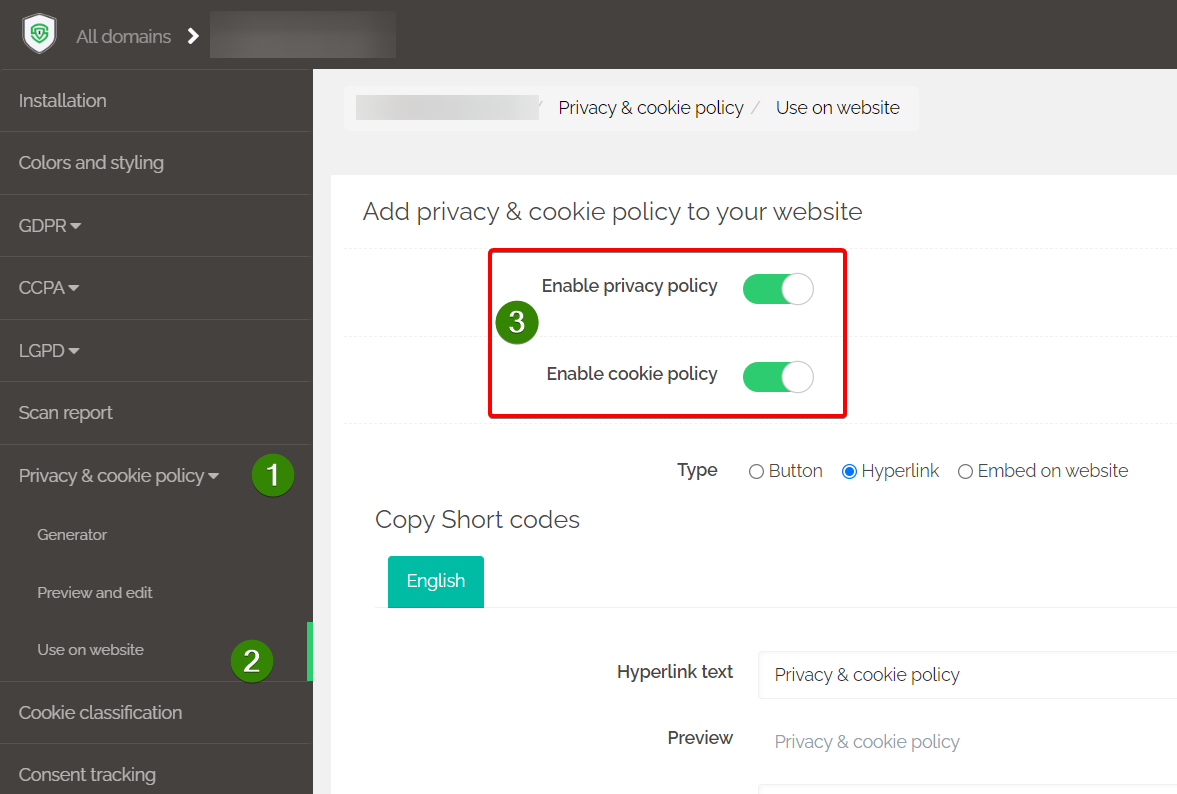
A privacy policy is a legal requirement under GDPR, informing visitors about how their personal data is collected, processed, and stored. If this action is flagged, your privacy policy may not be enabled or displayed correctly on your website.
Enable SSL on Your Website
An SSL certificate encrypts data transmitted between your website and its visitors, verifies site ownership, prevents fraudulent site impersonation, and builds visitor trust. If this action is flagged, contact your website administrator or domain provider to obtain and install an SSL certificate for your domain.
Common Issues and Fixes
Low Overall Compliance Score
Ensure Secure Privacy is correctly installed on your website and that all recommended actions above have been completed. Incomplete actions — particularly unblocked cookies and missing consent banners — have the greatest impact on your Overall Rating.
Cookies not blocking correctly
Verify that your blocking setup matches your website technology stack. If auto-blocking is not covering specific cookies, use the manual tag blocking configuration in Classification > Tag Blocking. See the cookie blocking guide for step-by-step instructions.
International data transfer compliance issues
Confirm that all personal data transfers to third countries are covered by an appropriate GDPR Chapter V transfer mechanism — either an adequacy decision or Standard Contractual Clauses. Review the flagged transfers in your scan report and apply the correct safeguard for each.
Cookie consent banner not displaying
Check that the cookie banner is enabled in your compliance module settings and that the Secure Privacy script is correctly installed on your website. If the banner is configured but not appearing, verify there are no Content Security Policy (CSP) conflicts blocking the banner from loading.
Frequently Asked Questions
What does the Overall Rating in Secure Privacy measure?
The Overall Rating reflects your website's current GDPR compliance posture based on the scan results — including cookie blocking coverage, consent banner presence, privacy policy availability, SSL status, and international data transfer compliance. Each flagged action with a red X reduces your score and represents a specific compliance gap that needs to be addressed.
How often should I review my Recommended Actions?
Review your Recommended Actions whenever you make changes to your website — such as adding new plugins, third-party services, or marketing scripts. A full rescan should be triggered after any significant change, and a routine check is recommended at least quarterly as part of ongoing compliance management.
Will completing all recommended actions guarantee full GDPR compliance?
Completing all recommended actions significantly improves your compliance posture and closes the most common technical gaps. However, GDPR compliance is broader than technical configuration — it also encompasses internal policies, staff training, data processing documentation, and vendor management. The Secure Privacy recommendations address the website-level compliance layer.