
Secure Privacy's Target Audience setting lets you show your cookie consent banner and Privacy Center only to visitors from the relevant geographic region — so GDPR banners display to European visitors, CCPA banners to California visitors, and LGPD banners to Brazilian visitors. This ensures your compliance tools are shown to the right audience without interrupting visitors from other regions.
Who Is This For?
Website owners and administrators configuring geographic targeting for their cookie consent banner
Compliance teams ensuring GDPR, CCPA, or LGPD banners display only to the relevant regional audience
Developers setting up multi-regulation compliance with region-specific banner visibility
How to Configure Cookie Banner Target Audience
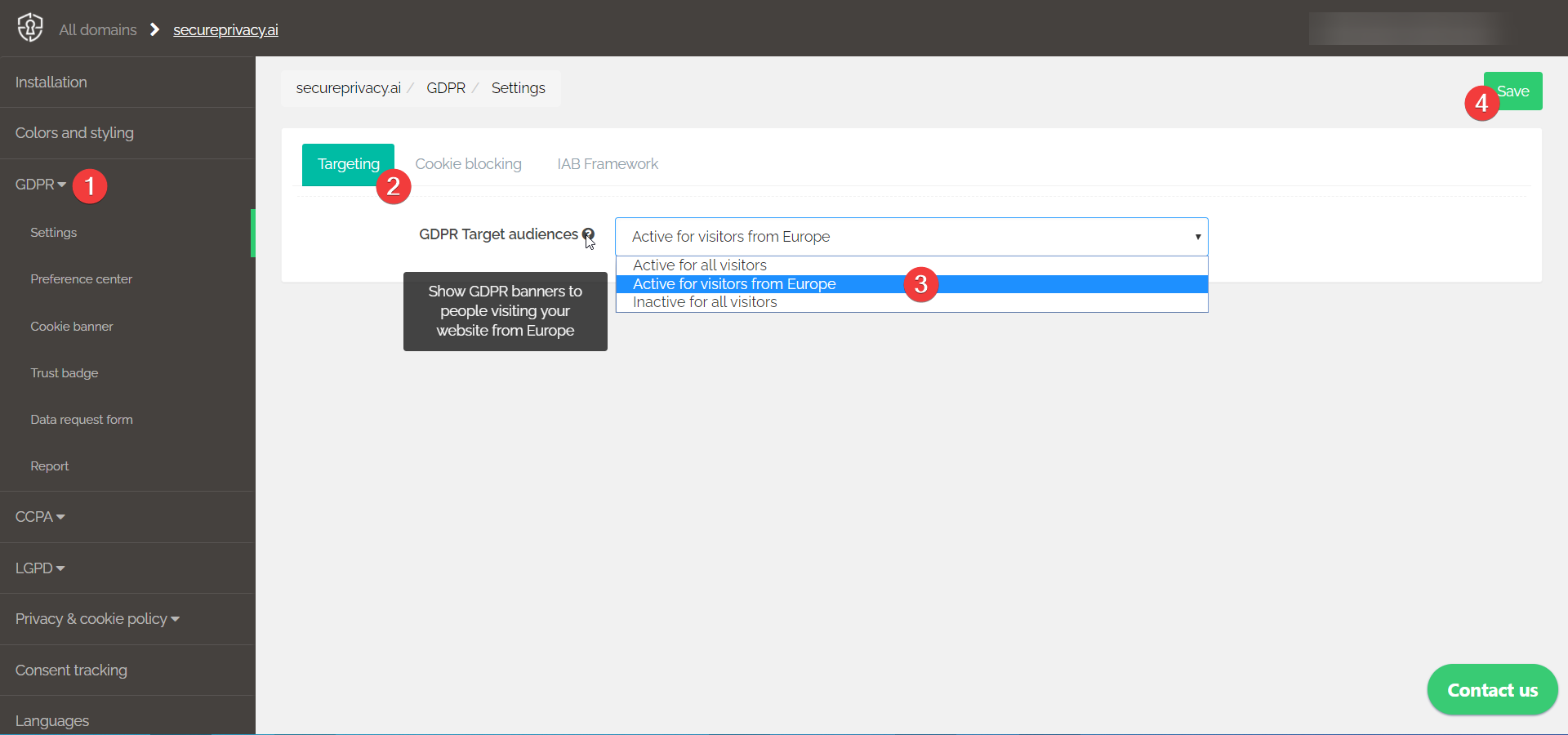
Log in to your Secure Privacy account and click the relevant compliance module in the left sidebar — GDPR, CCPA, or LGPD.
Click the Targeting section tab and open the Target Audience dropdown.
Select the appropriate audience option for the active compliance module:
GDPR: Active for visitors from Europe
CCPA: Active for visitors from California
LGPD: Active for visitors from Brazil
Click Save to apply the target audience setting.
Frequently Asked Questions
What happens to visitors outside the targeted region?
Visitors outside the targeted region will not see the cookie consent banner or Privacy Center for that compliance module. If you have multiple compliance modules active — for example, both GDPR and CCPA — each module displays its banner only to visitors within its respective target audience.
Can I show the cookie banner to all visitors regardless of location?
Yes. Select the Active for all visitors option from the Target Audience dropdown if you want the banner to display to every visitor regardless of their geographic location.
Do I need to configure targeting separately for each compliance module?
Yes. Target audience settings are configured independently for each compliance module — GDPR, CCPA, and LGPD each have their own Targeting section. Make sure to set and save the target audience for each module you have active in your account.