
If a specific cookie or service is not automatically detected by Secure Privacy's scanning engine, you can manually add it to your scan report using the Classification tab. This ensures accurate detection, classification, and blocking for cookies that fall outside standard auto-detection — keeping your cookie declaration complete and your compliance posture current.
Who Is This For?
Website administrators adding custom or non-standard cookies not detected by the automatic scanner
Compliance teams ensuring all active cookies and services appear in the scan report and cookie declaration
Developers adding known third-party services that require manual classification and blocking configuration
How to Add a Custom Cookie or Service to Your Scan Report
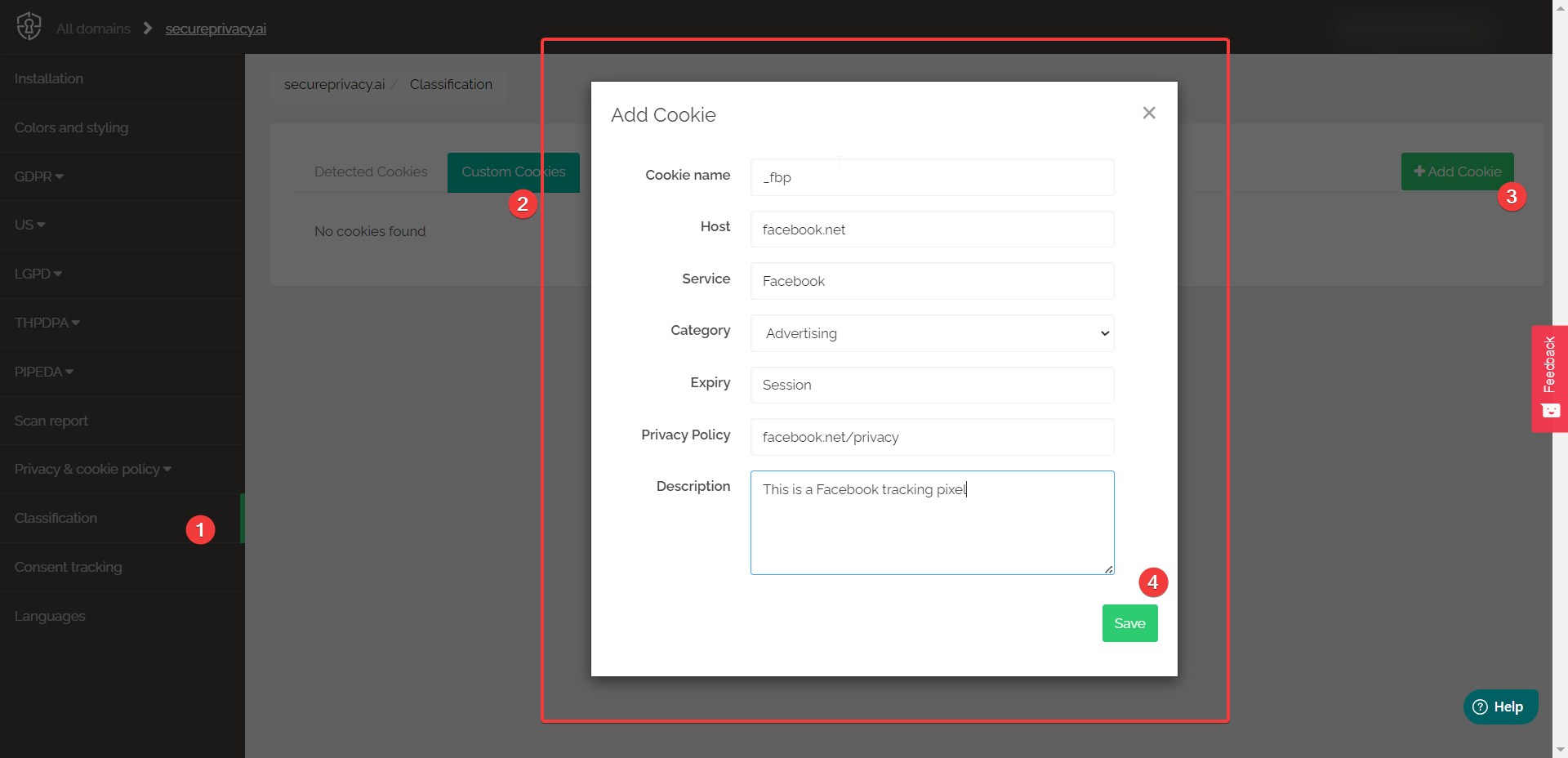
Log in to your Secure Privacy dashboard and navigate to the Classification tab for your website.
Click Add Custom Cookie or Add Custom Service — depending on whether you are adding an individual cookie or a broader service.
Enter the required details — including the cookie or service name, category, description, and any relevant domain or URL information.
Save the entry. The custom cookie or service will now appear in your classification list.
Navigate to Scan Report > Rescan Website to apply your changes and verify the custom entry appears correctly in your updated scan report.
Keep Your Scan Report Accurate and Up to Date
Manually adding known cookies and services ensures your scan report, cookie declaration, and privacy policy accurately reflect all tracking technologies active on your website — including those not yet covered by Secure Privacy's automatic detection. Keeping your classification list current is essential for demonstrating GDPR and ePrivacy compliance to regulators and website visitors.
Frequently Asked Questions
Why might a cookie or service not be detected automatically?
Secure Privacy's scanner detects cookies based on its known service database. Custom-built tracking solutions, newer third-party services, or cookies set through non-standard implementations may not yet be in the automatic detection database. Manually adding them ensures they are classified, declared, and blocked correctly.
What information do I need to add a custom cookie?
You typically need the cookie name, the domain it is associated with, its category (e.g., Analytics, Marketing, Functional), and a brief description of its purpose. This information appears in your cookie declaration and helps visitors understand what each cookie does before giving or withholding consent.
Do I need to rescan after adding a custom cookie or service?
Yes. After saving a custom entry in the Classification tab, trigger a rescan from Scan Report > Rescan Website to apply the changes. The rescan ensures your updated classification is reflected in your live cookie declaration and blocking configuration.