
The detailed cookie banner in Secure Privacy gives your website visitors full transparency into the cookies and services active on your site — displaying cookie categories and descriptions in an expanded view rather than a simple accept/decline prompt. Enabling it takes just two steps.
Who Is This For?
Website owners enabling the detailed cookie banner for greater visitor transparency
Compliance teams switching from a simple to an advanced cookie consent banner to meet GDPR granularity requirements
Developers and administrators configuring cookie banner type settings in Secure Privacy
How to Enable the Detailed Cookie Banner
Step 1: Navigate to Cookie Banner Settings
Log in to your Secure Privacy account. In the left sidebar, select GDPR (or the applicable compliance module), click the Cookie Banner tab, then click the Settings sub-tab.
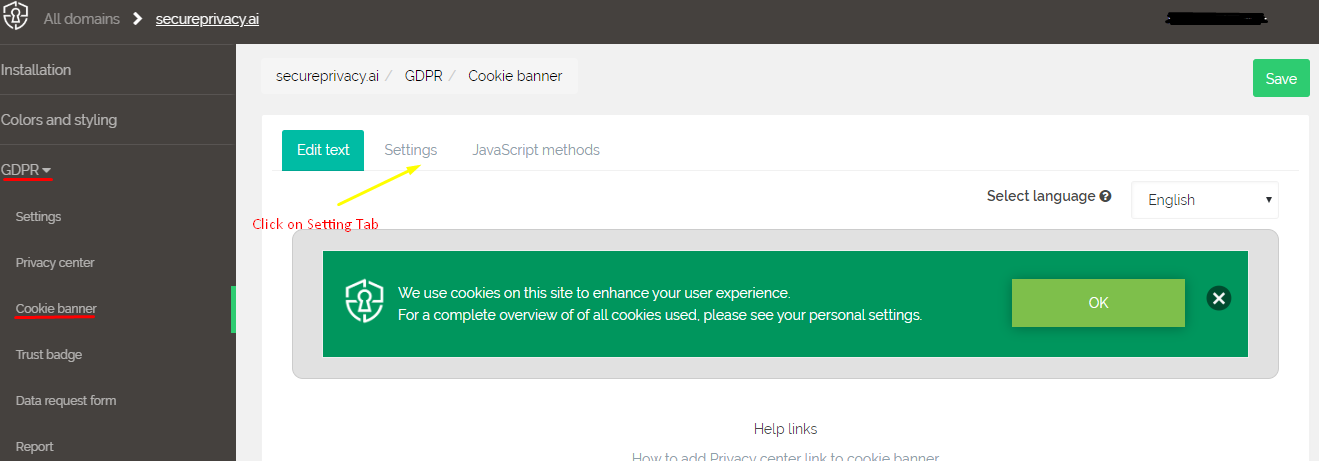
Step 2: Switch the Banner Type from Simple to Detailed
The default cookie banner type is set to Simple. Click the Detailed option to switch to the advanced banner view, then click Save to apply the change.
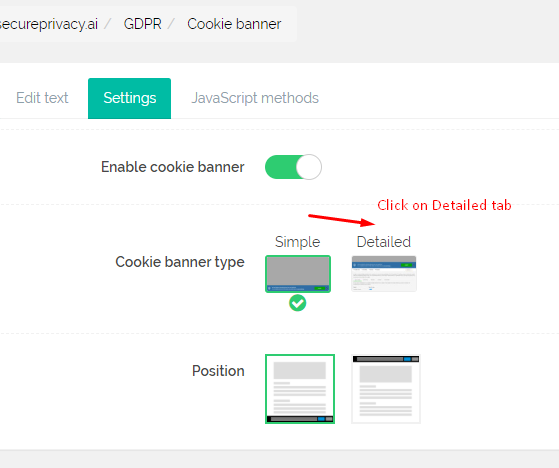
The detailed cookie banner is now enabled. Visitors to your website will see the expanded banner with full cookie category descriptions, as shown below:

Frequently Asked Questions
What is the difference between the Simple and Detailed cookie banner?
The Simple banner displays a basic consent prompt with accept and decline options. The Detailed banner expands this to show individual cookie categories — such as Essential, Analytics, and Marketing — with descriptions of each category's purpose, giving visitors granular control over their consent choices. The Detailed banner supports stronger GDPR compliance by providing greater transparency at the point of consent.
Can I switch back to the Simple banner after enabling Detailed?
Yes. Return to GDPR > Cookie Banner > Settings and switch the banner type back to Simple, then save. The change takes effect immediately.
Does enabling the Detailed banner affect my compliance score?
Switching to the Detailed banner improves transparency — which is a positive signal for GDPR compliance. It gives visitors more granular consent options, which aligns with the GDPR principle that consent should be specific and informed.