
Google Consent Mode (GCM) is an API from Google that helps website owners integrate user consent choices into Google tag behavior, ensuring privacy compliance with tools like the global site tag or Google Tag Manager (GTM).
With Secure Privacy, you can implement Google Consent Mode in two ways:
- Basic Mode
- Advanced Mode (this tutorial)
GCM v2 supports five consent types: advertisement, analytics, functional, personalization, and security cookies, with two new parameters: ad_user_data and ad_personalization.
Who Is This For?
- Website administrators
- Developers & technical marketers
- Compliance and privacy professionals
Why Use Advanced Consent Mode?
Advanced Mode lets you control how tags behave based on user consent. For example, if a user declines analytics cookies, only aggregate analytics data is sent, helping balance privacy with website performance measurement.
How Secure Privacy Integrates with Consent Mode
Secure Privacy passes user consent choices to Google, ensuring your website only collects data with user permission and falls back to aggregated data when declined. This helps you stay compliant and build user trust.
How to Set Up Google Consent Mode (Advanced) with GTM
- Click Add.
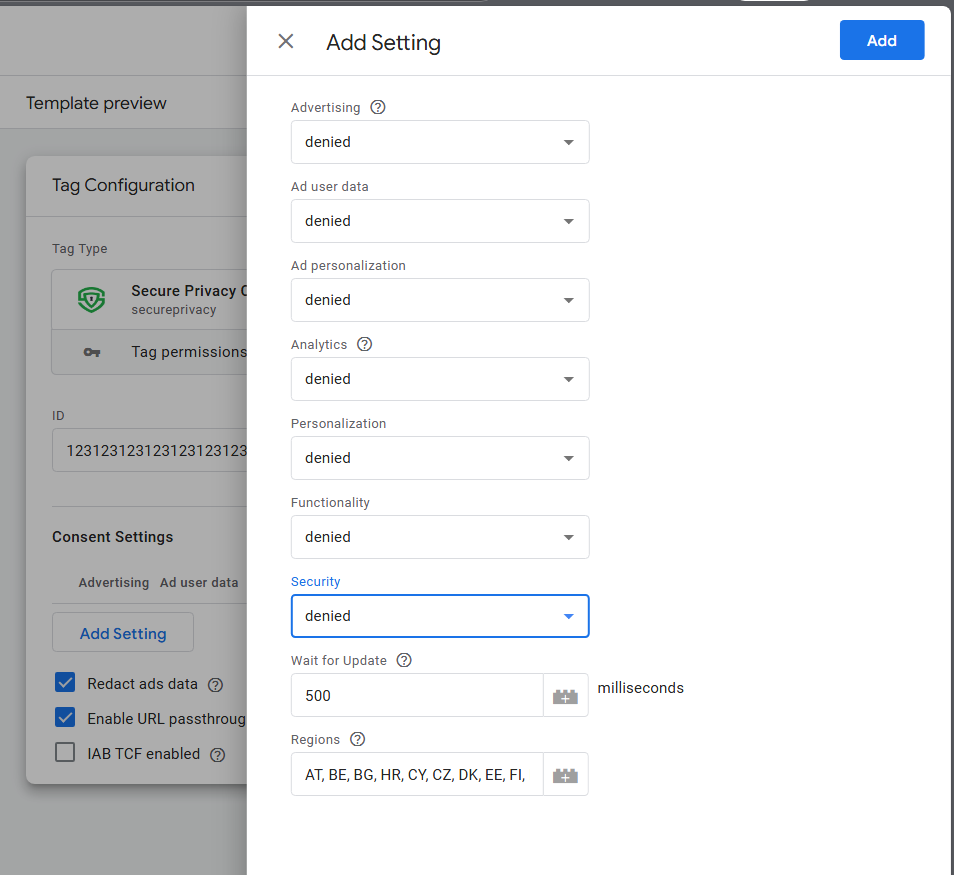 Step 5: Select “Consent Initialization – All Pages” as the trigger for the tag.
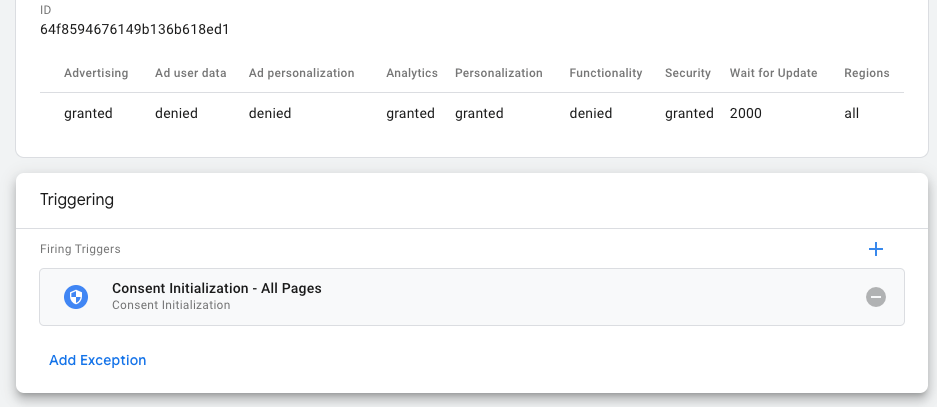 Step 6: Click Save to complete the integration.
Blocking Third-Party Cookies in GTM (Optional)
If you add third-party scripts using GTM, you may need to block cookies set by those scripts when users have not granted consent. See our article: How-to: block cookies with Google Tag Manager.
Conclusion
By integrating Secure Privacy with GCM using this advanced method, your website respects user consent and complies with major data privacy regulations, while still enabling robust analytics and digital marketing.
Need Further Assistance?
Contact our support team at [email protected].
For urgent matters regarding Google Consent Mode, email [email protected] – we aim to respond within one business day.
Common Issues & Fixes
- Tag not firing as expected? Double-check step order in GTM and ensure you set the correct trigger (Consent Initialization – All Pages).
- Consent not reflected? Verify your Secure Privacy Domain ID and consent configurations.
- Still not working? Check our troubleshooting collection or contact support.