
Secure Privacy lets you customize which pages are included in or excluded from your website scans — helping you focus cookie detection on key areas of your site and exclude irrelevant or redundant pages from your reports. This guide explains how to configure the scan page list and apply the changes.
Who Is This For?
Website administrators customizing scan coverage to match their site's structure and compliance priorities
Compliance officers tracking cookie and service detection on specific website sections
Developers managing privacy scans for complex or large websites where full scanning is not practical
How to Include or Exclude Pages from Secure Privacy Scanning
Log in to your Secure Privacy account and select the domain you want to manage.
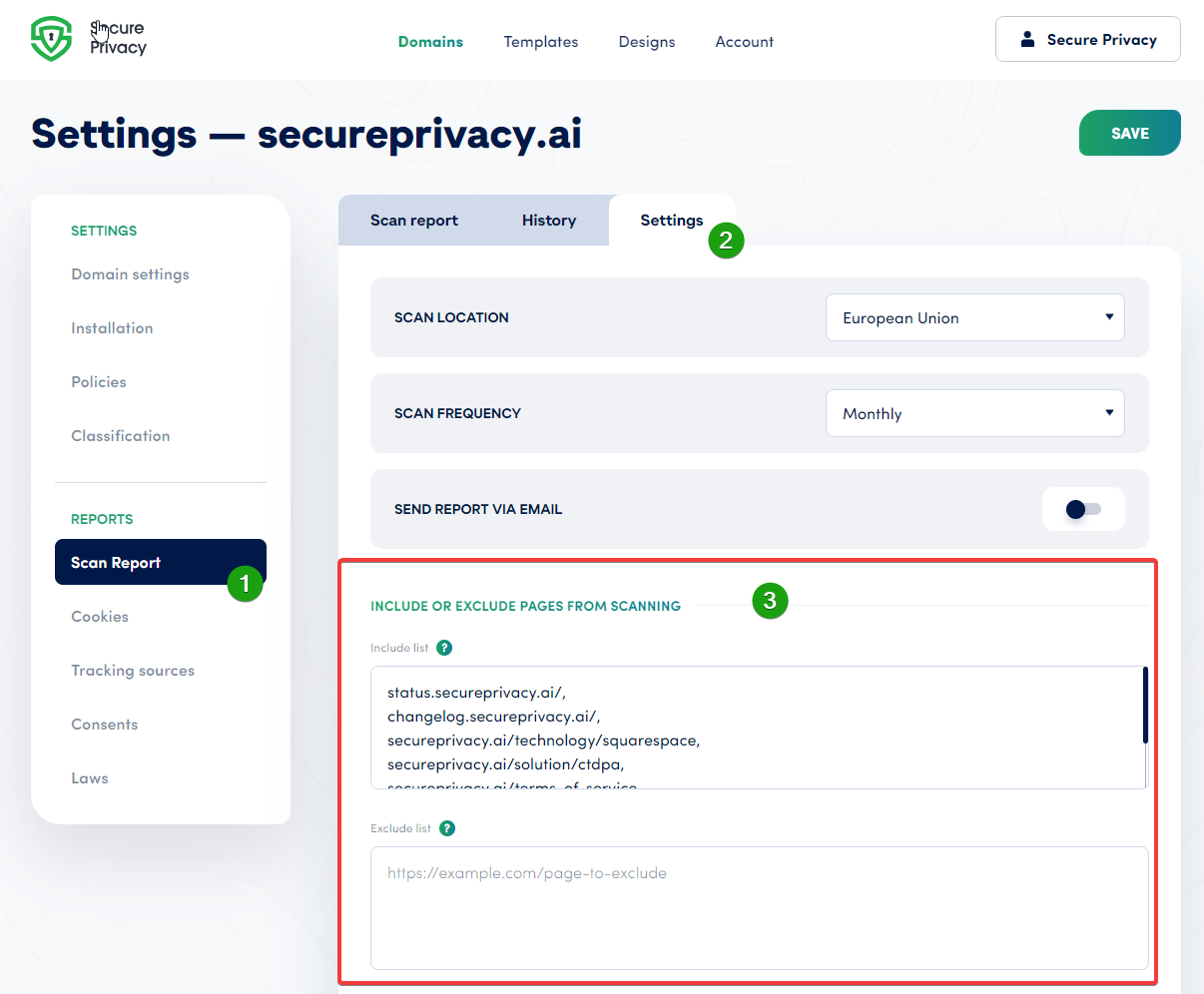
Click Scan Report in the left sidebar.
Switch to the Settings tab.
Locate the Include or Exclude Pages from Scanning section.
Add page URLs to the Include list to ensure those pages are always scanned, or to the Exclude list to prevent them from being scanned.
Click Save to apply your changes.
Return to the Scan Report tab and click Rescan Website to run a new scan with the updated page list.
Frequently Asked Questions
Can I include or exclude multiple pages at once?
Yes. You can paste multiple URLs into the Include or Exclude list — enter each URL on a separate line. All listed URLs will be applied when you save and trigger a rescan.
How long does a rescan take after updating the page list?
Most rescans complete within a few minutes. The exact time depends on the number of pages being scanned and the complexity of your website. Larger sites with many pages or third-party scripts may take slightly longer.
What is the difference between the Include list and the Exclude list?
The Include list specifies pages that should always be scanned — useful for ensuring key pages like your homepage, checkout, or contact pages are always checked for cookies. The Exclude list specifies pages to skip during scanning — useful for removing admin panels, login pages, or other areas where cookie detection is not relevant to your compliance reporting.