
Drupal is a powerful, open-source content management system known for its flexibility and modular architecture. Since 2001, it has evolved into a favored platform for complex, scalable websites used by governments, enterprises, educational institutions, and communities.
Drupal’s modular structure allows extensive customization through contributed modules and themes. This guide will walk you through installing the Secure Privacy Drupal module.
- New to Secure Privacy? Please follow the entire guide.
- Already onboarded? You can skip directly to the "Downloading Drupal Module" section.
Who Is This For?
- Drupal developers and administrators integrating Secure Privacy
- Website owners aiming for compliance with privacy regulations
- Technical teams managing consent management system setups
Getting Started with Secure Privacy
- Keep this tab open and open a new tab to continue with Drupal module installation.
Downloading Drupal Module
- Download the Secure Privacy Drupal Module and save it locally.Extract the downloaded archive on your local machine.
Upload the extracted secure_privacy folder to your Drupal site's modulesdirectory using FTP or your server’s file manager.
- For Drupal 8, 9, and 10, use the recommended paths:
/modules/contrib/or/modules/custom/
Set correct file permissions (755 for folders and 644 for files).
Installing Drupal Module
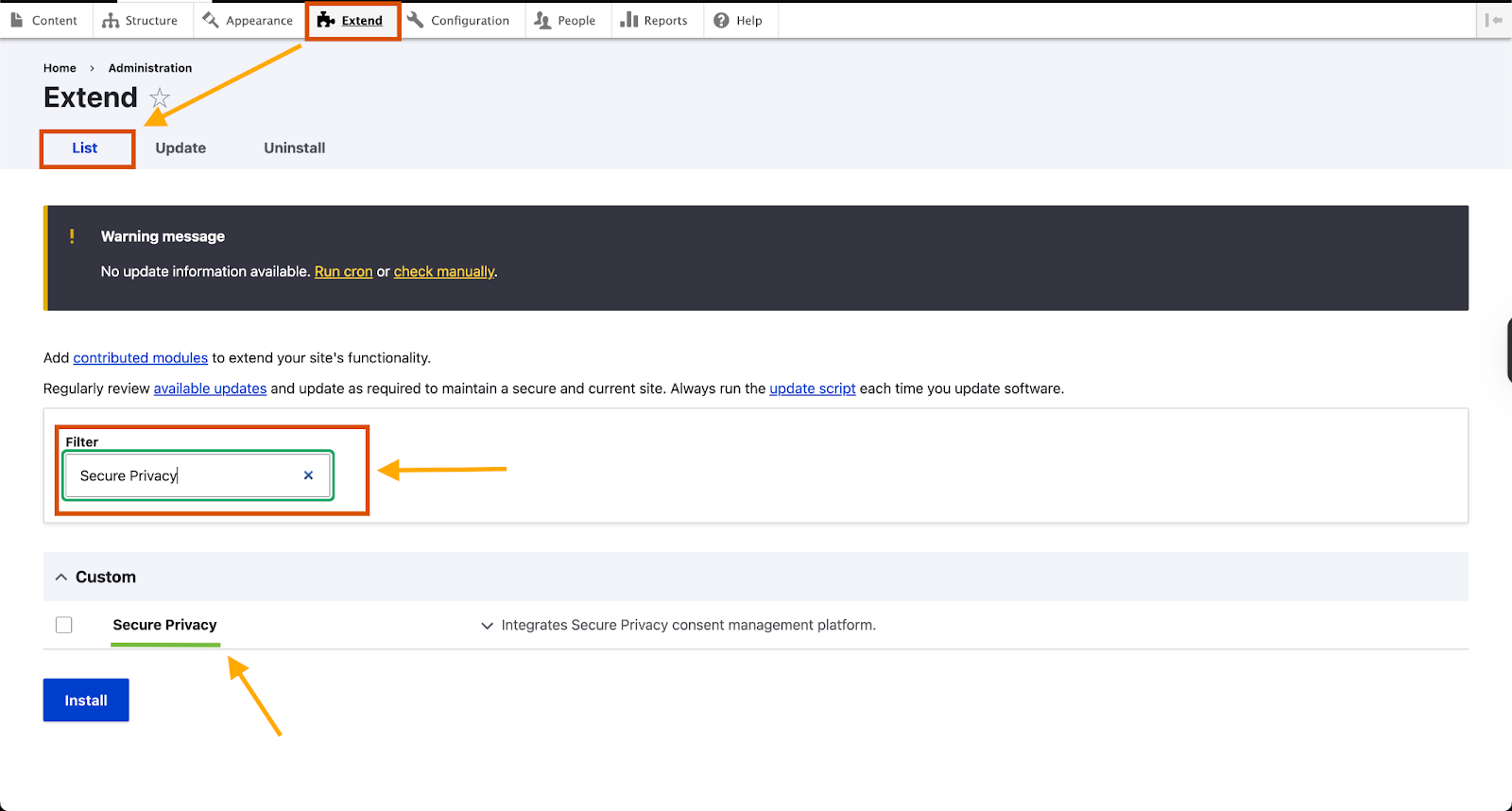
- Navigate to the Extend menu.If installed properly, you will find Secure Privacy listed under the “List” tab.
- Navigate to the Extend menu.If installed properly, you will find Secure Privacy listed under the “List” tab.
Enable the Secure Privacy module by selecting it and clicking "Install".
Configuring the Secure Privacy Drupal Module
- Check Enable Secure Privacy and click Save configuration.
Continue Secure Privacy Setup
- A toast notification confirming successful installation will appear on the bottom left of the screen.

- A toast notification confirming successful installation will appear on the bottom left of the screen.
- A toast notification confirming successful installation will appear on the bottom left of the screen.
Common Issues & Fixes
The Secure Privacy module is not showing up in the Extend list. What should I do?Verify the secure_privacy folder is correctly uploaded to the modules/contrib/ or modules/custom/ directory with proper permissions.I cannot see the configuration screen for the module.Ensure the module is enabled in the Extend menu and you are logged in with administrator privileges.My script does not seem to load on the website.Double-check that the correct installation script has been pasted and saved in the module configuration.