
The Privacy Risk Management module in Secure Privacy's Governance Solution provides a systematic approach to identifying, evaluating, and mitigating privacy risks across your organization's data processing activities. It enables privacy professionals to conduct structured risk assessments, develop mitigation strategies, assign ownership, and maintain continuous oversight — supporting GDPR compliance, Data Protection Impact Assessments (DPIAs), and broader privacy program governance.
Who Is This For?
Data Protection Officers and privacy managers responsible for GDPR risk assessment and DPIA workflows
Compliance and legal teams identifying and tracking privacy risks across processing activities
IT and security teams managing technical risks associated with personal data processing systems
Risk owners and team members assigned to monitor and remediate identified privacy risks
Purpose and Functionality
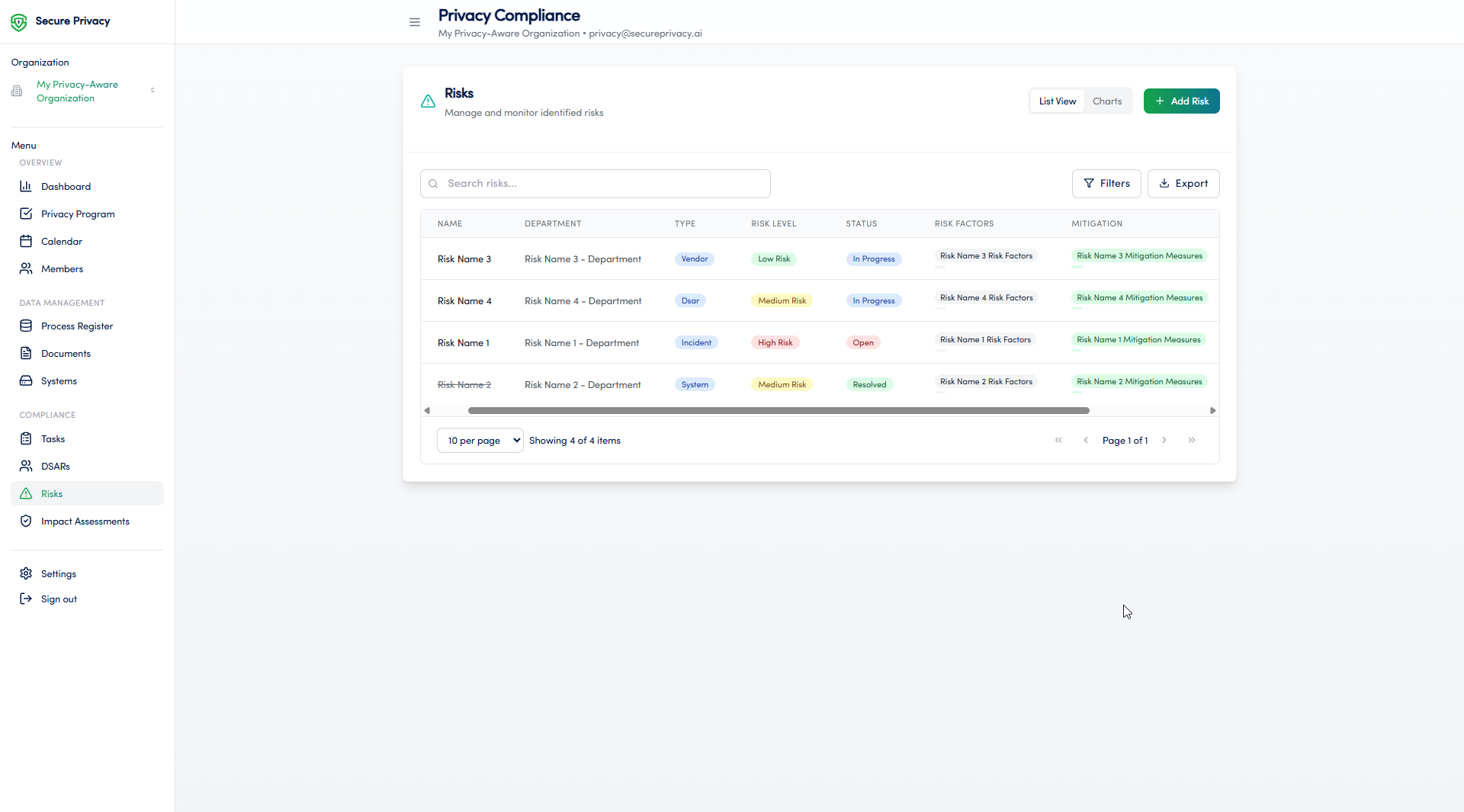
The Privacy Risk Management module is a core component of Secure Privacy's Governance Solution, giving compliance teams a single, structured environment to document privacy risks, score their likelihood and impact, plan mitigations, and track remediation progress. By integrating risk management directly into the governance platform, it creates a clear, auditable chain from identified risk to mitigation — supporting DPIA requirements under GDPR Article 35 and the accountability principle under Article 5(2).
How to Use the Privacy Risk Management Module
Navigate to the Privacy Risk Management section from the main navigation menu in the Governance Solution.
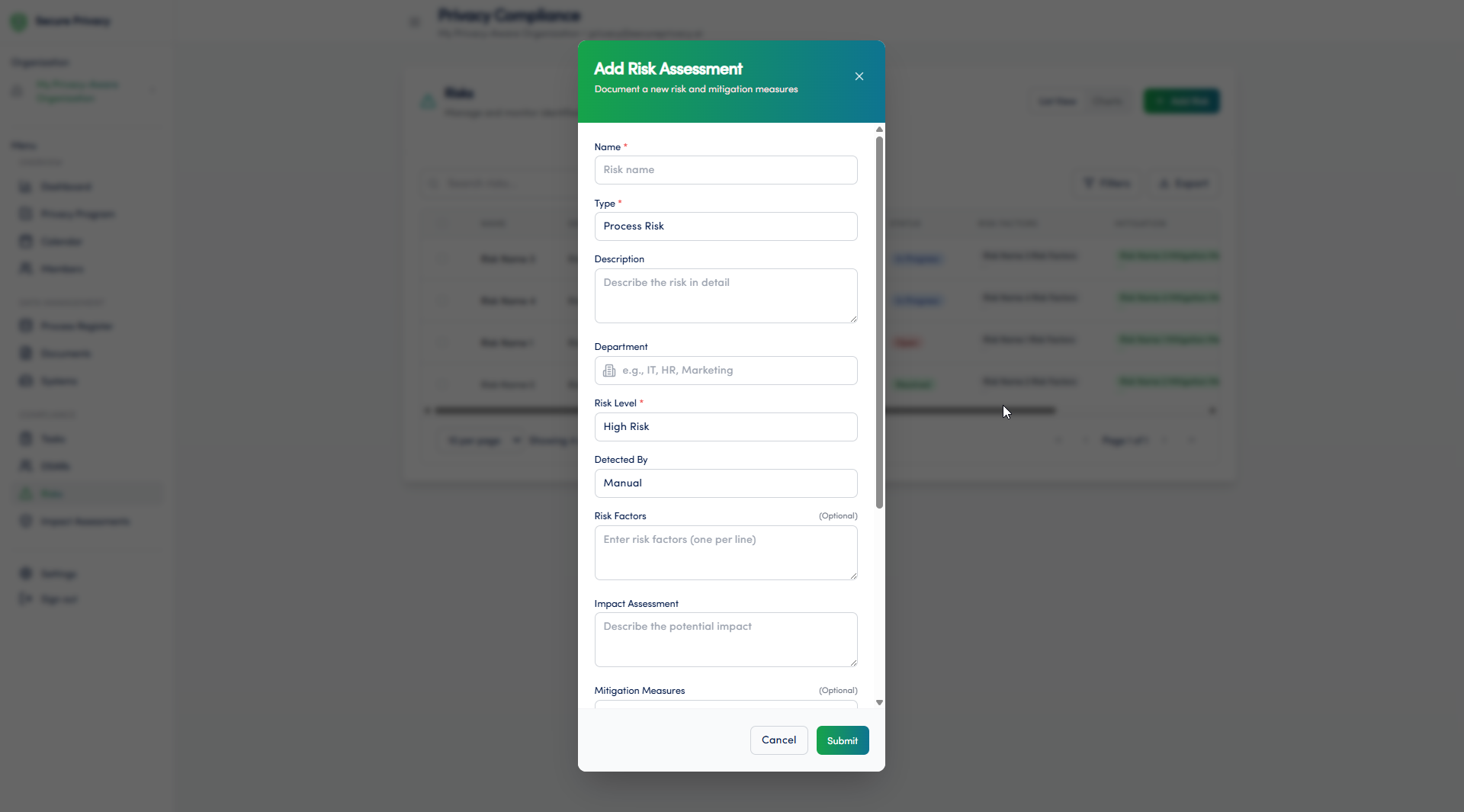
Create a new risk entry and document the risk name, description, and the data processing activity it relates to.
Categorize the risk by type — Security, Compliance, or Operational — and score it using the likelihood and impact matrix.
Define mitigation measures to address the identified risk, including the controls to be implemented and their target completion date.
Assign the risk to a team member for ongoing management and accountability.
Monitor mitigation progress through the risk register and update status as actions are completed.
Review and reassess risks periodically or whenever the associated processing activity changes.
Available Features
Risk assessment and documentation: Create structured risk records with descriptions, categories, likelihood and impact scores, and links to relevant processing activities.
Risk categorization and prioritization: Classify risks by type and severity to focus remediation efforts on the highest-priority items first.
Mitigation planning: Document specific mitigation measures, assign deadlines, and track implementation status for each identified risk.
Assignment of responsibilities: Assign risk ownership to specific team members, ensuring clear accountability for monitoring and remediation.
Common Use Cases
Identifying and assessing privacy risks associated with data processing activities — supporting DPIA pre-screening and structured risk documentation under GDPR Article 35.
Developing and tracking mitigation plans to reduce identified risks to an acceptable level before or during processing.
Monitoring the ongoing status of risk mitigation efforts across the organization — with audit-ready records for supervisory authority review.
Troubleshooting
Cannot add a new risk
Verify that your account has the necessary permissions to create entries in the Privacy Risk Management module. Only users with the appropriate role can add new risks. Contact your Secure Privacy account administrator to review your access rights.
Cannot assign a risk to a team member
The team member must have an active user account within your Secure Privacy organization with the appropriate role assigned. Check that the intended assignee exists in the Members module and has the correct permissions. Contact your account administrator if the user account needs to be created or updated.
Frequently Asked Questions
How does the Privacy Risk Management module support GDPR DPIA requirements?
The module supports DPIA workflows by providing a structured environment for identifying risks to data subjects' rights and freedoms, scoring their likelihood and severity, and documenting mitigation measures — the core elements required under GDPR Article 35(7). Risk records created in the module can feed directly into DPIA documentation, providing an auditable trail from risk identification to mitigation sign-off.
Can risks be linked to specific systems or processing activities?
Yes. Risk entries can be linked to processing activities and systems documented elsewhere in the Governance Solution, creating end-to-end traceability from data processing activity to identified risk to mitigation measure — supporting both ROPA accuracy and DPIA completeness.
Who should be assigned as a risk owner?
Risk ownership should be assigned to the team member with operational responsibility for the processing activity or system the risk relates to — typically the system owner, department head, or technical lead. The DPO or privacy manager retains oversight responsibility across the risk register as a whole.