
The Process Register module in Secure Privacy's Governance Solution is your central tool for documenting all data processing activities within your organization. Specifically designed to meet GDPR Article 30 Record of Processing Activities (ROPA) requirements, it ensures processing operations are accurately recorded, categorized, and linked to risk assessments — supporting compliance management, regulatory reporting, and audit readiness.
Who Is This For?
Data Protection Officers and privacy managers responsible for maintaining GDPR Article 30 ROPA compliance
Compliance and legal teams documenting data processing activities and their associated lawful bases
IT and information security teams recording technical measures and retention periods for processing activities
Process owners and department leads responsible for documenting the processing activities within their area
Purpose and Functionality
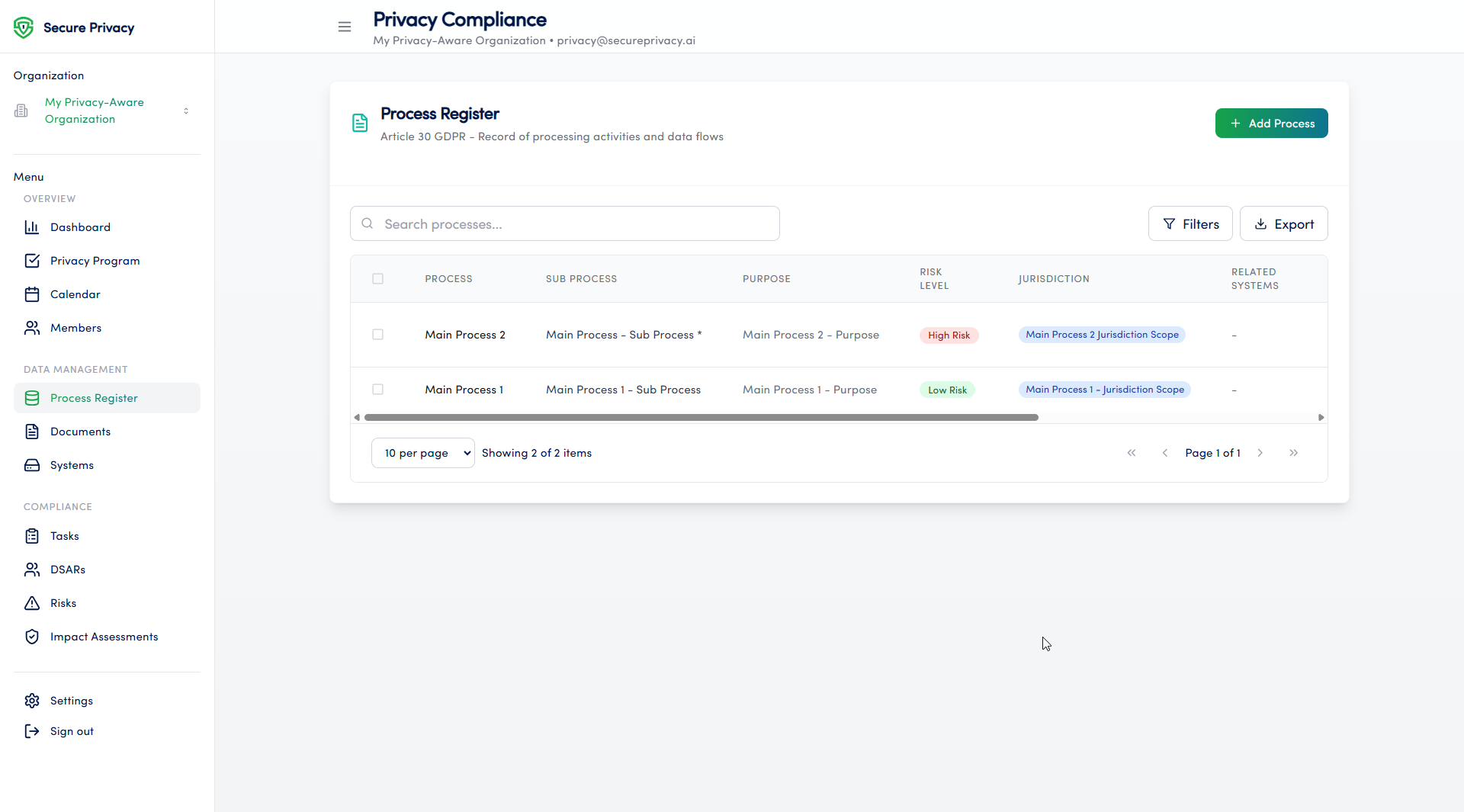
The Process Register module gives privacy and compliance teams a structured, centralized environment for building and maintaining their Record of Processing Activities. Each process entry captures the full range of GDPR Article 30 required fields — including purpose, data categories, retention periods, lawful basis, and technical measures — while integrating with the Governance Solution's risk assessment tools for end-to-end compliance traceability.
How to Use the Process Register Module
Navigate to the Processes page from the main navigation menu in the Governance Solution.
Click Add Process to create a new data processing activity record.
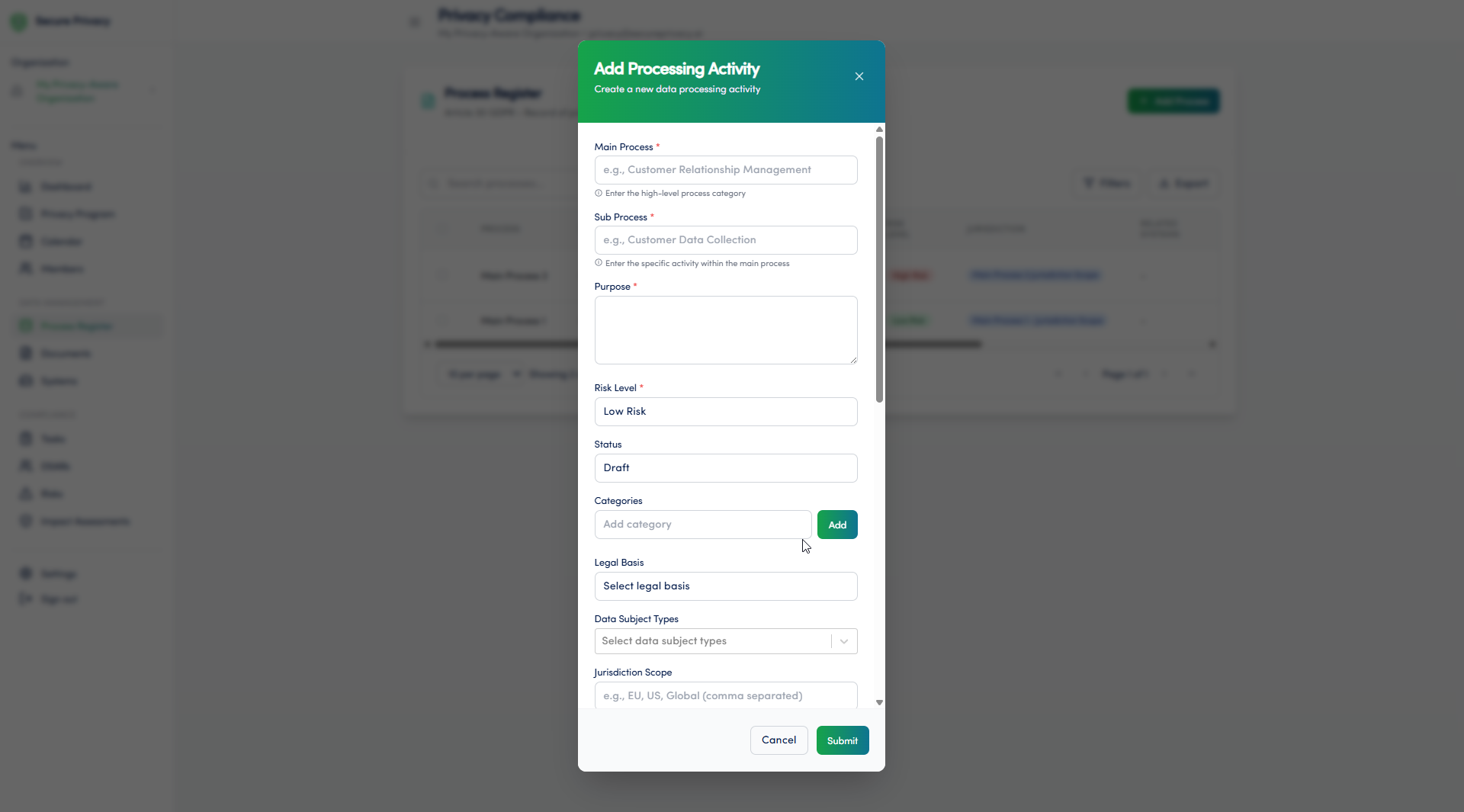
Complete all required fields — including process name, processing purpose, data categories, data subject categories, retention period, lawful basis, and technical and organizational security measures.
Assign a process owner and department to establish clear accountability for the processing activity.
Link the process to any relevant risk assessments in the Privacy Risk Management module.
Save the process record — it will appear in your ROPA and be available for regulatory reporting and audit purposes.
Available Features
Detailed process documentation: Capture all GDPR Article 30 required fields for each processing activity — including purpose, legal basis, data categories, recipients, retention periods, and security measures.
Categorization of processing activities: Organize processes by department, data subject type, or processing category to keep your ROPA structured and navigable as it grows.
Assignment of responsibilities: Assign each process to an owner and department — ensuring clear accountability for maintaining and updating each processing activity record.
Risk assessment integration: Link process records directly to risk assessments in the Privacy Risk Management module, creating end-to-end traceability from processing activity to identified risk to mitigation.
Common Use Cases
Building and maintaining a complete, accurate Record of Processing Activities (ROPA) as required by GDPR Article 30 — ready for supervisory authority inspection at any time.
Identifying and assessing privacy risks associated with specific processing activities — feeding into DPIA pre-screening and the Privacy Risk Management module.
Demonstrating processing transparency and compliance accountability to supervisory authorities, auditors, and customers through organized, readily accessible process documentation.
Troubleshooting
Cannot add a new process
Verify that your account has the necessary permissions to create entries in the Process Register module. Only users with the appropriate role can add new processing activities. Contact your Secure Privacy account administrator to review and update your access rights.
Risk assessment integration is not working
Check that risk assessment records exist in the Privacy Risk Management module and that your account has the permissions needed to link records across modules. If the issue persists after verifying settings, contact Secure Privacy support with details of the process record and the risk you are attempting to link.
Frequently Asked Questions
Does the Process Register module satisfy GDPR Article 30 ROPA requirements?
Yes. The module is specifically designed to capture all fields required under GDPR Article 30(1) for controllers — including the name and contact details of the controller and DPO, processing purposes, data categories, data subject categories, recipients, international transfers, retention periods, and security measures. Records can be exported for regulatory reporting and supervisory authority submission.
Can multiple team members contribute to the same process record?
Yes. Process records can be assigned to an owner and department, and team members with appropriate permissions can edit and update records as processing activities evolve. Your DPO or privacy manager retains oversight of the register as a whole through the Governance Solution.
How often should process records be reviewed and updated?
Process records should be reviewed whenever the associated processing activity changes — including new data categories, updated retention periods, new recipients, or changes to technical security measures. A full ROPA review should also be conducted as part of your annual compliance audit to ensure all records remain accurate and current.