
Adobe Experience Cloud ID Service places cookies by default on browsers. To comply with GDPR, you need to block these cookies. This guide shows you how to easily configure the Adobe extension to opt-in users and prevent cookies from being set without consent.
Why Block Adobe Experience Cloud ID Service Cookies?
- The service places cookies automatically on user browsers.
- Blocking cookies is essential to meet GDPR privacy requirements.
How to Block Cookies Using Adobe Experience Cloud ID Extension
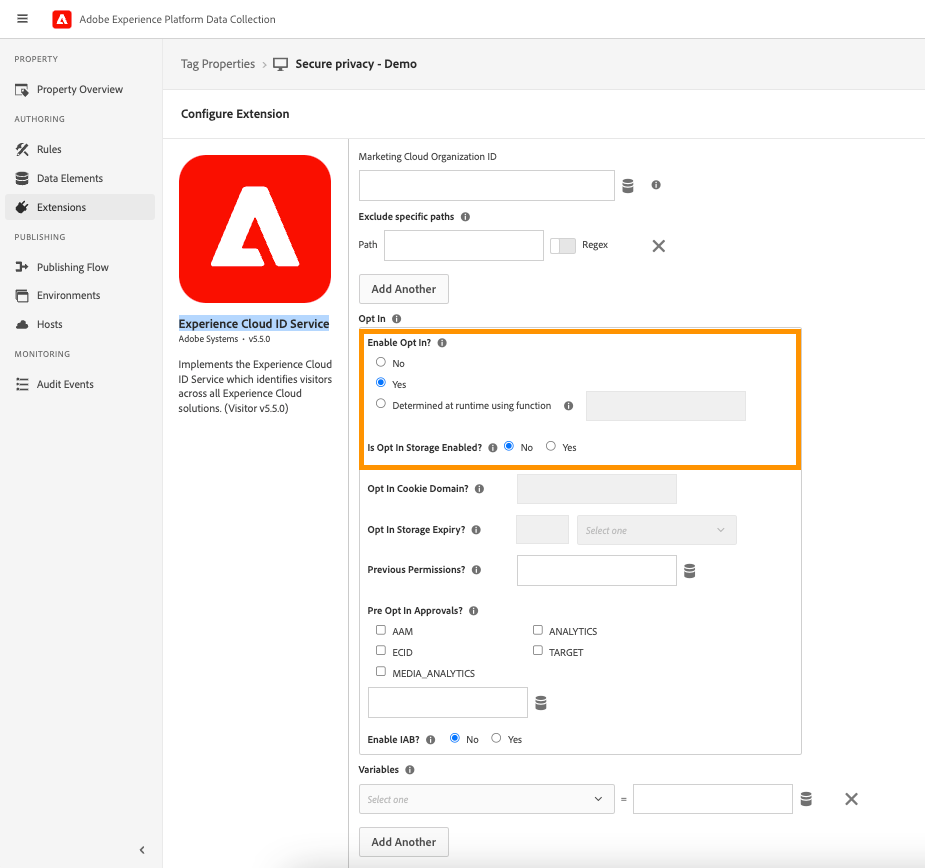
- Save your changes to activate cookie blocking until users opt in.
Additional Tips and Best Practices
- Make sure “Enable Opt In?” is correctly enabled.
- Test your website to verify that cookies do not load unless consent is given.
Who Should Use This Guide?
- Website compliance officers
- Privacy-focused developers
- Digital marketers managing Adobe Experience services
Common Issues & Fixes
Cookies not blocked despite enabling opt-in?
Try clearing your cache and confirm you are using the latest extension version.
Opt-in not functioning on some pages?
Check the path exclusions to ensure they are set up properly.
See Also
- [Ensuring Prior Consent for Non-Essential Cookies
](https://support.secureprivacy.ai/articles/240480-ensuring-prior-consent-for-nonessential-cookies-gdpr-compliance)